Active Module Identification
Principle
Note
DOMINO is looking for active modules in a network (e.g. protein-protein interaction (PPI) network) (Fig. 1 - middle part).
First, DOMINO defines target genes as active genes. Then DOMINO tries to identify active modules.
Active modules are subnetworks identified as relevant and composed of active genes (i.e. target genes) and other associated genes. Ideally, they will represent functional modules and can thereby reveal biological processes involved in a specific condition.
Finally, we performed an overlap analysis between each identified active module by DOMINO and rare disease pathways.
Overview of the DOMINO algorithm
The Fig. 3 is an overview of the DOMINO algorithm.
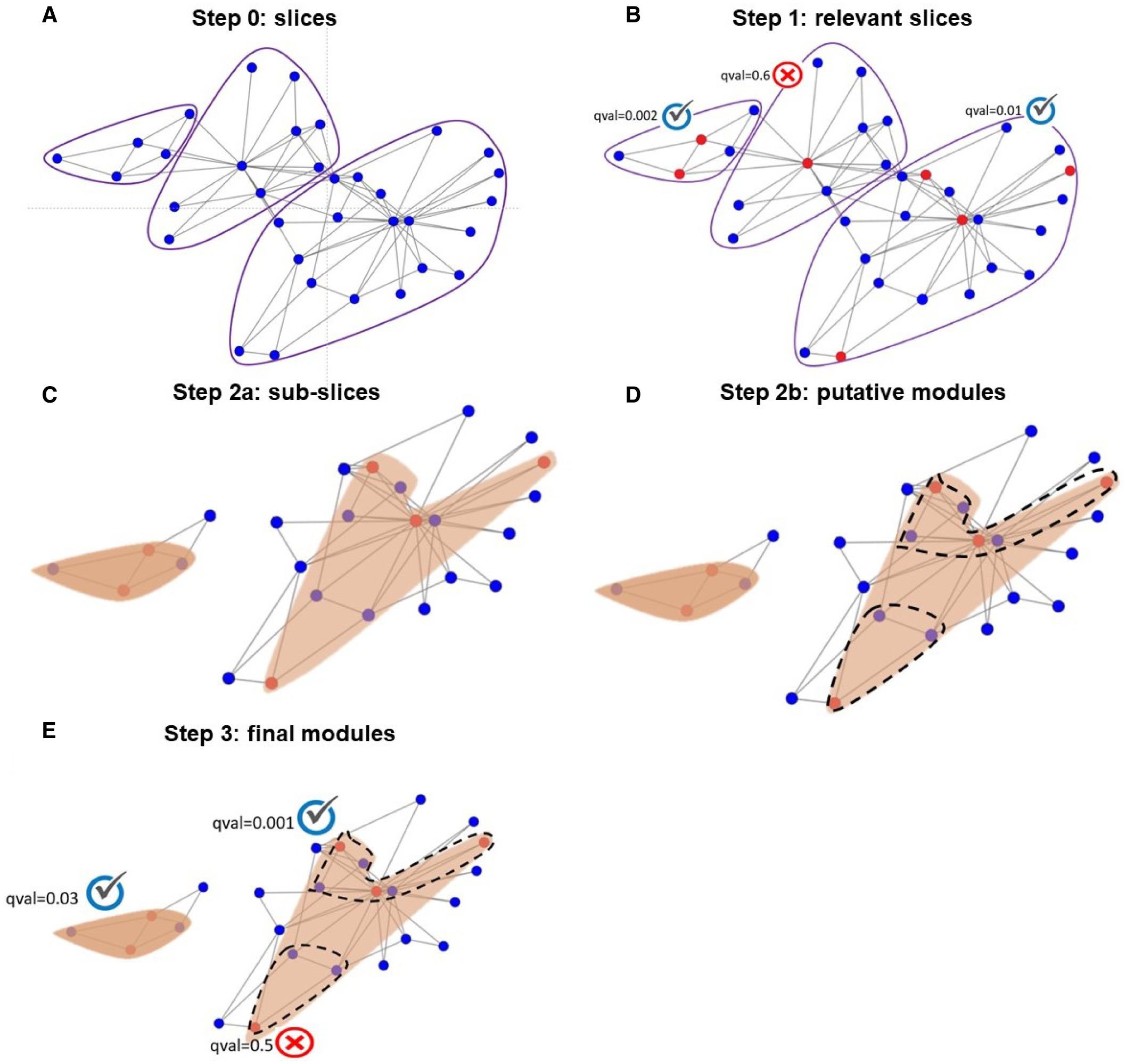
Fig. 3 : Schematic illustration of DOMINO (Fig3 from DOMINO’s paper [1])
For more details, see the DOMINO’s paper [1].
Usage
By default, data are directly retrieved from databases using queries (Fig. 4: section data retrieved
by queries). Chemical target genes are retrieved from the Comparative Toxicogenomics Database [3] (CTD) using --chemicalsFile parameter.
All rare disease pathways are retrieved from WikiPathways [4] automatically. And the biological network is also
downloaded from the Network Data Exchange [5] (NDEx) using --netUUID and --networkFile parameters.
You can provide your own target genes, pathways/processes of interest and biological network
(Fig. 4: section data provided by user) using --targetGenesFile, --GMT,
--backgroundFile and --networkFile.
The network file is required --networkFile whereas --outputPath is optional.
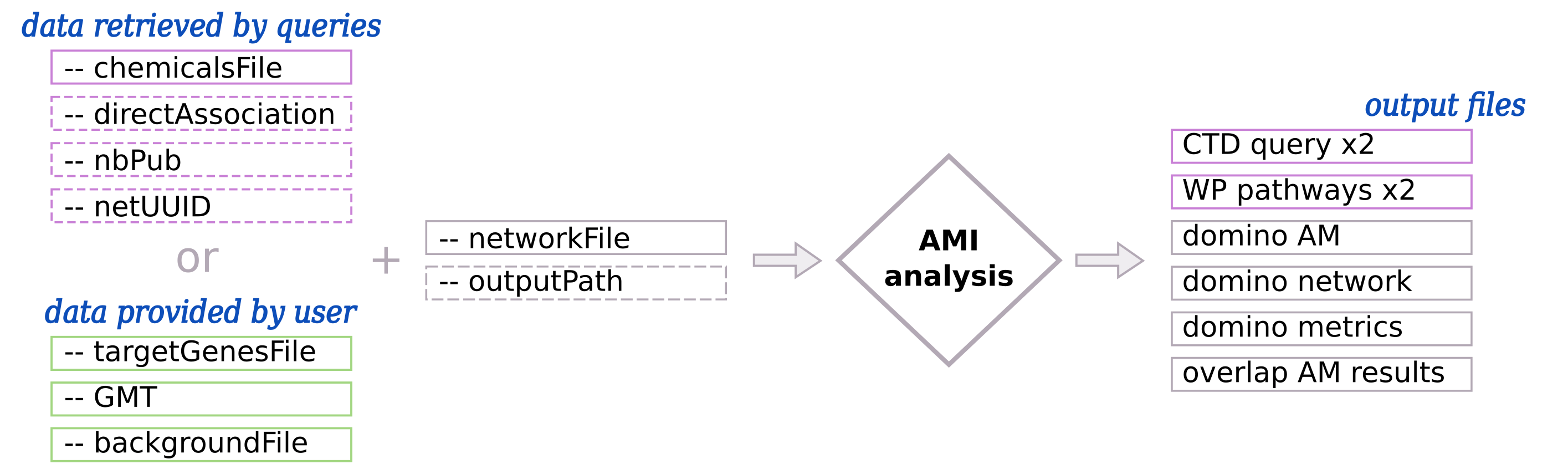
Fig. 4 : Input and output of Active Modules Identification (AMI)
(Left part) - By default, chemical target genes, rare disease pathways and biological networks are retrieved using automatic queries. The user can also provide their own data. Required inputs are represented with pink and green solid border line boxes whereas optional input are represented with dashed border line boxes. (Right part) - Output files that are in pink, are created only if the input data are retrieved by queries.
Input parameters for the AMI
Warning
Gene IDs have to be consistent between input data (target genes, GMT and networks)
When data are retrieved by queries, HGNC IDs are used.
Data retrieved by queries tab.Data provided by user tab.- -c, --chemicalsFile FILENAME
Contains a list of chemicals. They have to be in MeSH identifiers (e.g. D014801). Each line contains one or several chemical IDs, separated by “;” [FORMAT] [required]
- --directAssociation BOOLEAN
TRUE: retrieve genes targeted by chemicals, from CTDFALSE: retrieve genes targeted by chemicals and theirs descendant chemicals, from CTD[default: True]- --nbPub INTEGER
Each interaction between target gene and chemical can be associated with publications. You can filter these interactions according the number of associated publications. You can define a minimum number of publications to keep an association.
[default: 2]- --netUUID TEXT
Network UUID to download biological network from NDEx (e.g.
079f4c66-3b77-11ec-b3be-0ac135e8bacf)
- -t, --targetGenesFile FILENAME
Contains a list of target genes. One target gene per line. [FORMAT] [required]
- --GMT FILENAME
Tab-delimited file that describes gene sets of pathways/processes of interest. Pathways/processes can come from several sources (e.g. WP and GO:BP). [FORMAT] [required]
- --backgroundFile FILENAME
List of the different background source file name. Each background genes source is a GMT file. It should be in the same order than the GMT file. [FORMAT] [required]
- -n, --networkFile FILENAME
Network file name that contains network or to save network. The file is in SIF format [required]
- -o, --outputPath PATH
Folder name to save results.
[default: OutputResults]
Use-cases command lines
Examples of command lines with Data retrieved by queries and Data provided by user.
odamnet domino  --chemicalsFile useCases/InputData/chemicalsFiles.csv \
                --directAssociation FALSE \
                --nbPub 2 \
                --networkFile useCases/InputData/PPI_HiUnion_LitBM_APID_gene_names_190123.sif \
                --netUUID bfac0486-cefe-11ed-a79c-005056ae23aa \
                --outputPath useCases/OutputResults_useCase1
odamnet domino  --targetGenesFile useCases/InputData/VitA-Balmer2002-Genes.txt \
                --GMT useCases/InputData/PathwaysOfInterest.gmt \
                --backgroundFile useCases/InputData/PathwaysOfInterestBackground.txt \
                --networkFile useCases/InputData/PPI_HiUnion_LitBM_APID_gene_names_190123.sif \
                --outputPath useCases/OutputResults_useCase2