Random Walk with Restart
Principle
Note
The Random Walk with Restart is performed using multiXrank [1] – GitHub ReadTheDocs
The Random Walk with Restart (RWR) approach measures the proximity between chemical target genes and all the nodes (e.g. genes, diseases …) that are present in a multilayer network. All target genes are considered as seeds to start a walk. The proximity is represented by a RWR score, used to prioritize rare disease pathways. Higher score means smaller distance and better connexion with chemical target genes.
RWR is a diffusion analysis from chemical target genes using a multilayer network composed of different genes interaction networks and rare disease pathways network (Fig. 1 - right part).
For more details, see the multiXrank’s paper [1].
Usage
By default, data are directly retrieved from databases using queries (Fig. 5: section data retrieved
by queries). Chemical target genes are retrieved from the Comparative Toxicogenomics Database [2] (CTD) using --chemicalsFile parameter.
You can provide your own target genes (Fig. 5: section data provided by user) using
--targetGenesFile.
The --configPath, --networksPath, --seedsFile, and --sifFileName are required and provide multilayer
network data. To create or download multiplayer network, see Networks used page.
The --top and --outputPath parameters are optional.
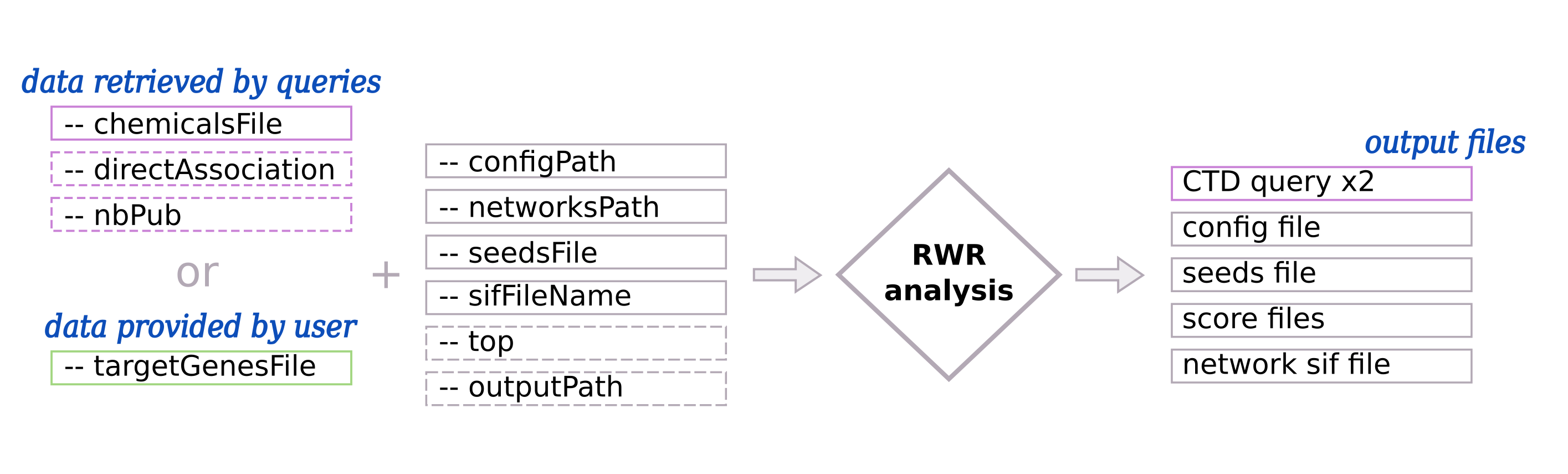
Fig. 5 : Input and output of Random Walk with Restart (RWR)
(Left part) - By default, chemical target genes are retrieved using automatic queries. The user can also provide their own data. Required input are represented with pink and green solid border line boxes whereas optional inputs are represented with dashed border line boxes. (Right part) - Output files in pink are created only if the input data are retrieved by queries.
Input parameters for the RWR
Warning
Gene IDs have to be consistent between input data (target genes, GMT and networks)
When data are retrieved by queries, HGNC IDs are used.
Data retrieved by queries tab.Data provided by user tab.- -c, --chemicalsFile FILENAME
Contains a list of chemicals. They have to be in MeSH identifiers (e.g. D014801). Each line contains one or several chemical IDs, separated by “;”. [FORMAT] [required]
- --directAssociation BOOLEAN
TRUE: retrieve genes targeted by chemicals, from CTDFALSE: retrieve genes targeted by chemicals and theirs descendant chemicals, from CTD[default: True]- --nbPub INTEGER
Each interaction between target gene and chemical can be associated with publications. You can filter these interactions according the number of associated publications. You can define a minimum number of publications to keep an association.
[default: 2]
- -t, --targetGenesFile FILENAME
Contains a list of target genes. One target gene per line. [FORMAT] [required]
- --configPath PATH
multiXrank needs a configuration file. This file can be short (with only file names) or very detailed (with file names + parameters). It contains at least paths of networks, bipartite and seed files. [required]
- --networksPath PATH
Folder path where networks are saved. [required]
- --seedsFile FILENAME
Path name file to store seed list. This file contains the target genes list. The given path needs to be the same given in the configuration file. [required]
- --sifFileName FILENAME
Output file name to save the result into a SIF file format. [required]
- --top INTEGER
Top nodes that will be saved into the output files.
- -o, --outputPath PATH
Folder name to save results.
[default: OutputResults]
Use-cases command lines
Examples of command lines with Data retrieved by queries and Data provided by user.
odamnet multixrank      --chemicalsFile useCases/InputData/chemicalsFiles.csv \
                        --directAssociation FALSE \
                        --nbPub 2 \
                        --configPath useCases/InputData/config_minimal_useCase1_sim.yml \
                        --networksPath useCases/InputData/ \
                        --seedsFile useCases/InputData/seeds.txt \
                        --sifFileName UseCase1_RWR_network_sim.sif \
                        --top 20 \
                        --outputPath useCases/OutputResults_useCase1
odamnet multixrank      --targetGenesFile useCases/InputData/VitA-Balmer2002-Genes.txt \
                        --configPath useCases/InputData/config_minimal_useCase2.yml \
                        --networksPath useCases/InputData/ \
                        --seedsFile useCases/InputData/seeds.txt \
                        --sifFileName UseCase2_RWR_network.sif \
                        --top 20 \
                        --outputPath useCases/OutputResults_useCase2